A properly configured robots.txt file is a small but essential component of technical SEO. It helps search engines understand which parts of your website should or should not be crawled. Despite its simplicity, many websites either misuse or completely ignore this file — and that can lead to major SEO issues.
What Is robots.txt and Why Is It Important?
The robots.txt file is a plain text file located in the root directory of a website (e.g., https://example.com/robots.txt). It is part of the Robots Exclusion Protocol, a standard that tells search engine crawlers which pages or files they are allowed to access and index.
The main purposes of a robots.txt file are:
- To limit crawler access to certain parts of a website
- To prevent overloading the server with too many requests
- To avoid indexing duplicate or sensitive content
- To manage crawl budget, especially for large websites
It's important to note that robots.txt doesn't prevent content from appearing in search results — it only instructs bots not to crawl it. If a page is linked from elsewhere, it may still be indexed unless additional measures (like meta tags or HTTP headers) are used.
How to Check the Validity of robots.txt Using Google and Yandex
To ensure that your robots.txt file is correctly written and doing its job, you can use the following tools:
- Google Search Console:
Under the Settings section, older versions included a "robots.txt Tester". Although this tool has been deprecated, you can still test individual URLs for crawlability via the URL Inspection Tool. This helps verify if crawling is blocked due to robots.txt. - Yandex.Webmaster:
Yandex offers a built-in robots.txt checker, where you can view parsing errors, the last time the file was downloaded, and test URLs against the rules. - Online validators (e.g., technical SEO tools or custom scripts):
These allow you to simulate the behavior of bots and see whether specific paths are blocked.
Common Directives in robots.txt (With Examples)
The robots.txt file supports several directives. These are interpreted differently by different crawlers, but most major search engines follow the same core logic.
Basic Structure:
User-agent: [name of bot]
Disallow: [URL path]
Allow: [URL path]
Examples:
- Block all bots from the entire site:
- Allow all bots to crawl everything:
User-agent: * Disallow: - Block a specific folder (e.g., /admin/):
User-agent: * Disallow: /admin/ - Block only Googlebot from a certain file:
User-agent: Googlebot Disallow: /private-data.html - Allow specific file in a disallowed folder:
User-agent: * Disallow: /images/ Allow: /images/logo.png - Set crawl-delay (Yandex and Bing support it; Google ignores it):
User-agent: Yandex Crawl-delay: 10 - Refer to the sitemap:
Sitemap: https://example.com/sitemap.xml
⚠️ Be cautious: a small typo in the file can block your entire site from being crawled.
Is robots.txt Mandatory and Do Search Engines Obey It?
Technically, a website does not need a robots.txt file. If it's missing, crawlers will assume there are no restrictions and will attempt to crawl all publicly available content.
However:
- Google, Bing, Yandex, and other major bots respect the
robots.txtfile if it's present. - Not all bots follow the rules — some spam or low-quality crawlers may ignore it.
- Some older or obscure bots may also interpret directives incorrectly.
To fully prevent a page from being indexed, it's best to combine robots.txt with:
noindexmeta tagsX-Robots-TagHTTP headers- Password protection or IP restrictions (for sensitive areas)
How to Check if a URL Is Blocked by robots.txt (Using SEOGismo)
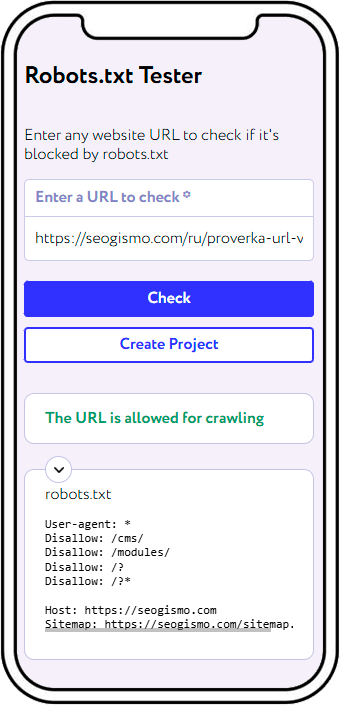 If you want to know whether a specific URL is blocked from being crawled by search engines, or whether your website uses a
robots.txt file at all — you can use SEOGismo.
With SEOGismo's online tool, you can:
- Instantly check whether
robots.txtexists - View its full contents
- See which URLs or directories are blocked
- Analyze crawlability of individual pages
- Check the HTTP response code of the file (200 OK, 404 Not Found, etc.)
This makes it easy to troubleshoot visibility issues and ensure that important pages aren't accidentally excluded from indexing.
Try it for free — just enter your site's domain and get a detailed report in seconds.
Key Nuances and Mistakes to Avoid
- Blocking JavaScript or CSS:
Modern SEO depends on how pages render. If CSS or JS files are disallowed, search engines may not see the page correctly. - Using
Disallow: /unintentionally:
This directive blocks your entire site. Always double-check your syntax before publishing. - Assuming
Disallow=Noindex:
Remember,robots.txtprevents crawling, but not always indexing. - Robots.txt is public:
Anyone can view yourrobots.txtby visitingyourdomain.com/robots.txt. Don't use it to hide sensitive data. - Wrong placement:
The file must be at the root level —https://example.com/robots.txt— not in a subfolder. - Case sensitivity:
On Linux servers,/Private/and/private/are different. Match your paths exactly.
The robots.txt file is a powerful yet simple way to control how search engines interact with your website. Whether you want to block a section from indexing, manage crawl traffic, or ensure your crawl budget is well spent, a well-maintained robots.txt is key.
To avoid costly mistakes, make a habit of checking and testing your robots.txt using tools like SEOGismo, Google Search Console, and Yandex.Webmaster. And remember: the best SEO starts with clear instructions to the bots that power search.