When a visitor clicks a link on your website, their browser sends a request to your server to load the page. The server responds with both the requested content and an HTTP status code — a message that tells the browser whether the request was successful or if there was an issue.
Depending on the status code, the browser will either display the requested page or show an error. A well-built website should handle these scenarios gracefully by showing clear, user-friendly error messages and offering navigation options.
Understanding HTTP Status Codes
HTTP status codes are three-digit numbers that fall into different categories:
- 1xx – Informational: The request is still being processed.
- 2xx – Success: The request was successful (e.g., 200 OK).
- 3xx – Redirects: The requested resource has been moved, and the browser should follow the redirect.
- 4xx – Client Errors: There's an issue with the request (e.g., 404 Not Found).
- 5xx – Server Errors: The server encountered an error and couldn't complete the request.
For proper SEO, all indexable pages on your website should return a 200 OK status. Pages with other codes (like 404 or 500) won't be indexed by search engines and can negatively affect your site's performance in search results.
Before making your site publicly accessible, it's a good idea to run an SEO audit to make sure your pages return the correct status codes. If you're seeing error codes, consult your developer or hosting provider for assistance.
Setting Up Redirects the Right Way
Redirects are a normal and necessary part of any website. Every page should have one canonical URL to avoid duplicate content and SEO issues. For example, if you've decided that all URLs should:
- Use HTTPS
- Exclude "www"
- End with a trailing slash
…then your developer should set up 301 redirects from all alternate versions to your preferred format.
Examples:
http://domain.com/page → https://domain.com/page/

http://www.domain.com/page → https://domain.com/page/

https://domain.com/page → https://domain.com/page/

http://domain.com/page/// → https://domain.com/page/
If you skip this, your site could end up with multiple versions of the same page indexed by search engines, which can harm your rankings.
Make sure all redirects lead directly to the final destination without unnecessary redirect chains. A clean redirect setup improves both user experience and SEO.
How to Check HTTP Status Codes Online
You can use the form at the top of this page to check the HTTP status of any URL. You'll get not only the final status code, but also the full redirect chain (if any exists).
Alternatively, you can inspect HTTP responses directly in your browser:
- Open the Developer Tools (usually F12 or right-click → Inspect).
- Go to the Network tab.
- Refresh the page and look at the status codes for each request.
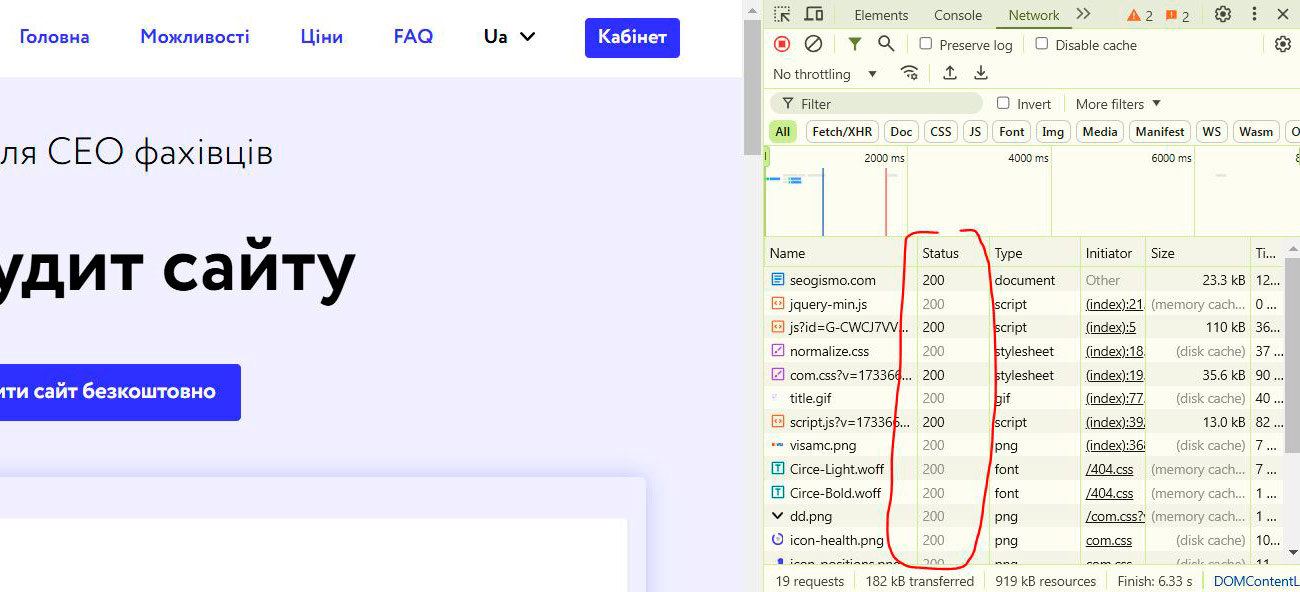
If the page goes through multiple redirects, you'll see each step in the list — useful for diagnosing redirect chains or misconfigurations.