Redirects are a critical part of any modern website. They help maintain SEO value, ensure a smooth user experience, and prevent broken links when content is moved or URLs are changed. However, incorrect or excessive redirects can harm your site's performance. With our free online redirect checker, you can instantly analyze any URL to see if it redirects, how many redirects are involved, and whether those redirects are working properly.
What Is a Redirect?
A redirect automatically forwards users and search engines from one URL to another. This is often used when:
- A page is moved to a new URL
- You're switching from HTTP to HTTPS
- You're consolidating content or changing site structure
There are several types of redirects:
- 301 (Permanent) — tells search engines to update their index
- 302 (Temporary) — for short-term forwarding
- Meta refresh or JavaScript redirects — less SEO-friendly
What Is a Redirect Chain?
A redirect chain occurs when one URL redirects to another, which then redirects again, and so on. While one redirect is usually fine, chains of multiple redirects can:
- Slow down page loading
- Confuse search engines
- Lead to indexing issues
- Cause ranking drops
For example:
page-a.com → page-b.com → page-c.com → final destination
Why You Should Check Redirects
Redirects should be clean, direct, and SEO-friendly. Our redirect checker helps you:
- See if a URL has redirects
- Identify redirect chains
- Detect loops or broken final destinations
- View HTTP status codes for each step (301, 302, 404, etc.)
How Our Redirect Checker Works
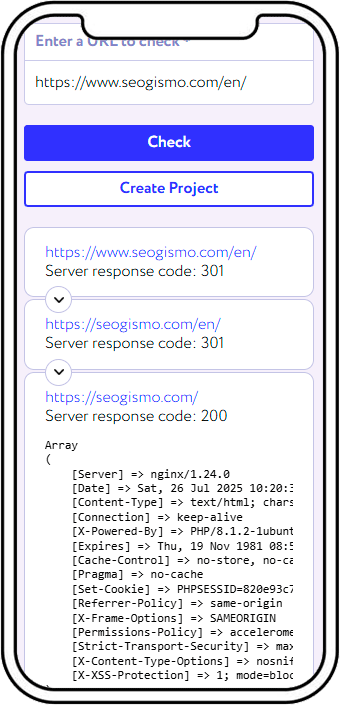 It's simple. Just enter any URL — a single page or your homepage — and our system will:
- Follow all redirects from start to finish
- Display each step in the chain
- Show you the type of redirect (301, 302, etc.)
- Highlight issues like redirect loops or non-200 final responses
You can also scan all internal links on your website to see which of them redirect and where they lead. This is useful for website audits, migration checks, link health verification.
Benefits of Using Our Tool
- Fast and free — no registration required
- Works with all websites (HTTP/HTTPS)
- Helps identify redirect-related SEO issues
- Ideal for developers, SEOs, and website owners
Best Practices for Redirects
- Use 301 redirects for permanent changes
- Avoid unnecessary chains — always redirect directly
- Check all redirects after site migrations or URL changes
- Monitor regularly to catch issues early
Redirects are powerful when used correctly — but they can also become a hidden source of SEO problems. Use our free online redirect checker to analyze any page or your entire site and keep your redirects clean and efficient.