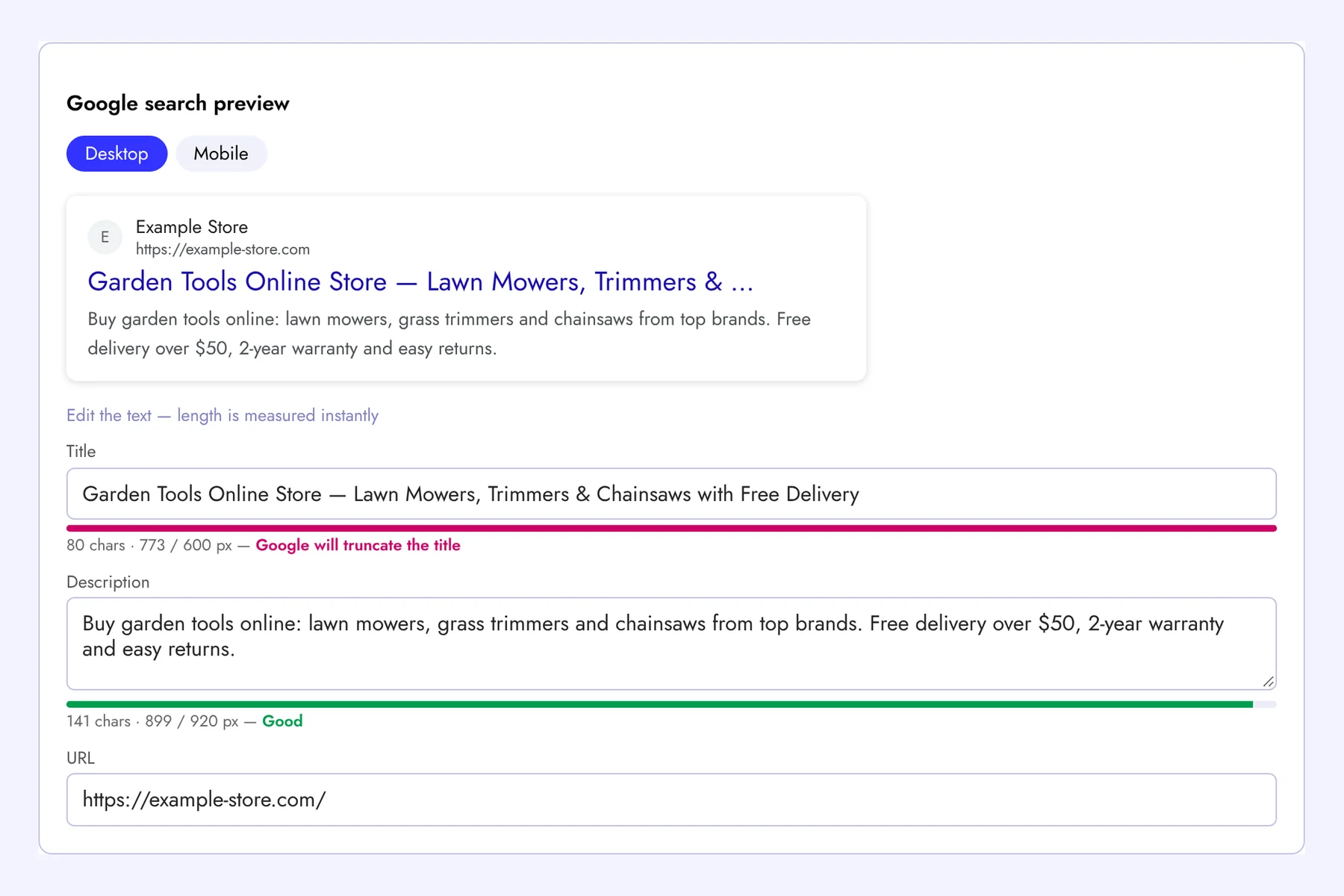
The meta tags checker analyzes any page in seconds and shows all the tags that affect how it appears in Google and on social media. Right below the results you get a SERP snippet preview: edit the title and description and immediately see how they will look in search results and whether Google will truncate them.
Which Tags We Check
- Title — presence, duplicates and length. The recommended length is 30–65 characters, the preview additionally measures the width in pixels (Google cuts titles at about 600 px);
- Meta description — presence and length (70–160 characters is optimal);
- H1 — whether the main heading exists and whether there is only one;
- Canonical — whether it points to this page or to another URL;
- Meta robots and X-Robots-Tag — a warning if the page is closed from indexing with noindex;
- Open Graph and Twitter Cards — og:title, og:description, og:image and others that control link previews in Facebook, Telegram, LinkedIn and X;
- Technical tags — viewport for mobile devices, the lang attribute, hreflang and favicon;
- Redirects — if the URL redirects, you will see the whole chain and the final page.
Google Snippet Preview: Write Titles That Get Clicks
The title and description are the first things people see in search results. A good snippet increases CTR even without changing positions. Use the preview to:
- see the desktop and mobile versions of the snippet;
- check that the key phrase and the main benefit fit before the ellipsis;
- try several variants before changing them on the site.
Keep in mind that Google may rewrite a title or description if it considers them irrelevant to the query, so write them for people: clear, specific and matching the page content.
Check Meta Tags on Every Page at Once
This tool checks one page at a time. Sign up for Seogismo and run a full site audit: we will crawl all pages and find missing and duplicate titles, empty descriptions, multiple H1s, canonical errors, noindex pages, broken links, slow pages and more than 100 other issues — with clear instructions on what to fix first. You will also get rank tracking, backlink monitoring and 24/7 website monitoring. 7 days free, no credit card.
FAQ
How long should a title tag be?
Aim for 30–65 characters, or up to about 600 pixels. Put the main keyword closer to the beginning.
Do meta keywords matter?
No. Google has ignored the keywords meta tag for many years, so we do not check it.
Why does Google show a different title than mine?
Google rewrites titles that are too long, stuffed with keywords or do not match the page content. Make the title shorter and more specific and make sure it matches the H1.