fb
Site Health Check
An effective platform for SEO professionals, marketers, and website owners
Get instant results. No credit card required.
Website SEO AuditSEO MonitoringContent MarketingSEO Specialist Toolkit
Site Health Check
Site Health Check
Site Health Check
Platform Stats
3840 Websites Audited
132,07К Pages Analyzed
621,87М Issues Detected
33,63К Keywords Analyzed
SEO Analysis Available for All Major CMS Platforms
Wordpress Joomla Magento Shopify OpenCart Drupal Bitrix24 MODX WIX PrestaShop TYPO3 Tilda Grav Craft CMS October CMS
Who is this service for
SEO specialists
Can audit their sites to improve performance and ensure proper implementation of changes.
Website owners
Can independently analyze their websites for issues and monitor contractors during SEO campaigns.
Marketers
Audit your own or competitors’ websites and build a digital marketing strategy based on the results.

Website SEO Optimization Error Check

Our online tool helps you identify website issues that search engines consider when ranking pages in search results.

The SEO validator is useful for both beginner SEO specialists and agencies managing multiple websites. You can run a full error check in just a few clicks after registering. The detailed report can be downloaded and shared with clients or passed on to developers for fixing.

If your website has hundreds or thousands of pages, manually detecting SEO issues can be time-consuming. Moreover, a single optimization error can affect multiple pages. To save time and improve efficiency, it's best to use our automated service.

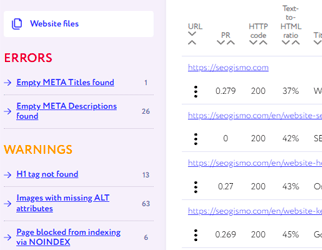
All detected SEO issues are categorized by severity:

Critical Errors

These must be fixed first, as they have a major impact on your website's visibility in search results. SEOgismo detects critical errors such as:

  • Missing SSL certificate or missing 301 redirect from HTTP to HTTPS
  • Duplicate versions of URLs with and without www
  • Missing or misconfigured 404 error pages
  • Broken internal or external links
  • Duplicate Title and Meta Description tags
  • Empty or missing Meta tags
  • Duplicate H1 tags
  • Missing robots.txt file
  • Missing sitemap.xml file
Critical Errors

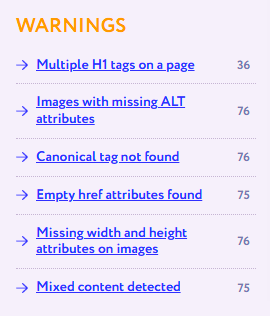
Warnings

These are secondary but still important SEO issues. Fixing them can improve your rankings in search engines:

  • Presence and count of H1 tags on each page
  • Number of images without ALT attributes
  • Pages blocked from indexing (via meta tags or robots.txt)
  • Pages returning incorrect HTTP response codes
  • Pages missing a canonical tag
  • Redirected links and their target URLs
  • Mobile-friendliness status of your pages
SEO Warnings

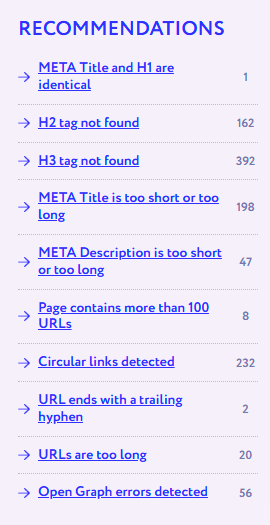
Recommendations

SEOgismo also highlights non-critical issues that can help boost your site's performance when fixed:

  • Pages with over 100 outbound links
  • Pages where H1 and Title tags are identical
  • Too short or too long Title and Meta Description tags
  • Circular (looping) links
  • Pages with low content-to-code ratio
  • Missing H2 or H3 tags
  • Number and status of external links
  • Non-SEO-friendly URLs (non-human-readable or dynamic)
  • Missing favicon.ico
  • Pages with zero internal PageRank
  • URLs with uppercase letters or trailing dashes
  • Pages containing nofollow attributes

...and much more.

Recommendations

For each page, the tool also calculates an internal PageRank score based on your site's internal linking structure.

Check your website
Get instant results. No credit card required.
Get 100 free page checks after registration.
SEO analysis starts from just 1USD per site
with pay-as-you-go flexibility — pay only for what you use.
View Pricing
Reviews
Real User Experiences
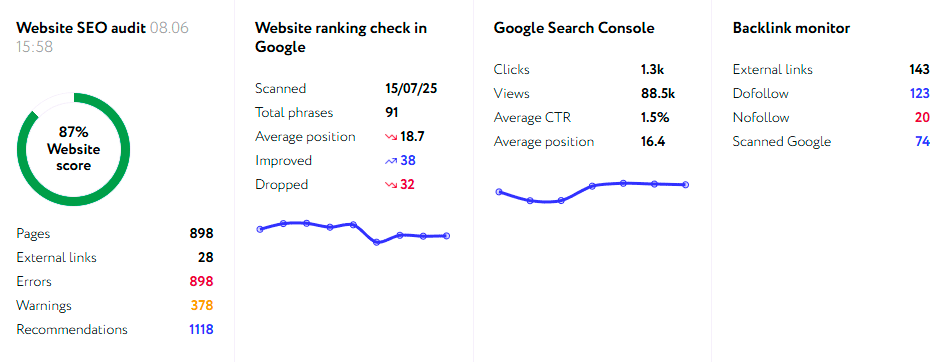
Simple, clean, and effective. I especially like the backlink monitoring – it checks weekly if the links are still live and indexed. Saves me a lot of manual work.
Great service for quick SEO audits. It helped me spot technical issues on my client’s site that other tools missed
FAQ
What are the limitations of the free trial?
The demo version doesn’t support exporting reports to Excel.
What do I need to start a website audit?
Just sign up, enter your website’s domain, and start the scan — it’s that simple.
Does the audit affect my website’s performance during the check?
No, the audit doesn’t impact your website in any way. It continues to run normally while the check is in progress.
How long does a website check take?
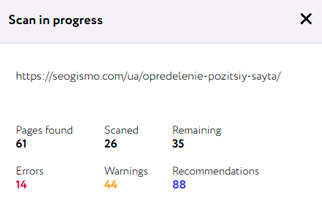
On average, it takes about 5–10 minutes. However, the duration may vary depending on factors like the number of pages, whether images need to be checked, the status of outbound links, and more.
Can I perform a technical SEO audit on any website?
You can perform an SEO analysis of any website, including those built with JavaScript frameworks such as Angular, React, or Vue. Seogismo now supports JavaScript rendering, ensuring accurate analysis even for dynamic pages.
SEO Specialist Toolkit
HTTP Status Code Checker
Get a detailed response for any URL
Learn more
UTM Link Builder
Track the performance of your advertising campaigns.
Learn more
WebP Image Converter
Convert JPG, GIF, and PNG images to the modern WebP format
Learn more
CSS Minifier
Minify your .css files to speed up site loading.
Learn more
Outbound Link Checker
Check external links, their anchors, response codes, and other attributes.
Learn more
Broken Link Checker
Quick check of internal links for a specific website page.
Learn more
Redirect Checker
Detect 3xx redirects on a page and analyze redirect chains.
Learn more
Robots.txt Tester
Enter any website URL to check if it's blocked by robots.txt
Learn more
Free XML Sitemap Validator
Free online tool for ensuring your sitemap is error-free, optimized, and ready for search engines
Learn more